Cochise County Unconditional Lien Waiver on Progress Payment Form
Last validated October 9, 2026 by our Forms Development TeamFormatted for recording in Cochise County, for property anywhere in the county: rural and unincorporated areas as well as Benson, Bisbee, Bowie, Cochise, Douglas, Dragoon, Elfrida, Fort Huachuca and 12 more.
- 3 documents included
- Immediate PDF download
- Formatting guarantee
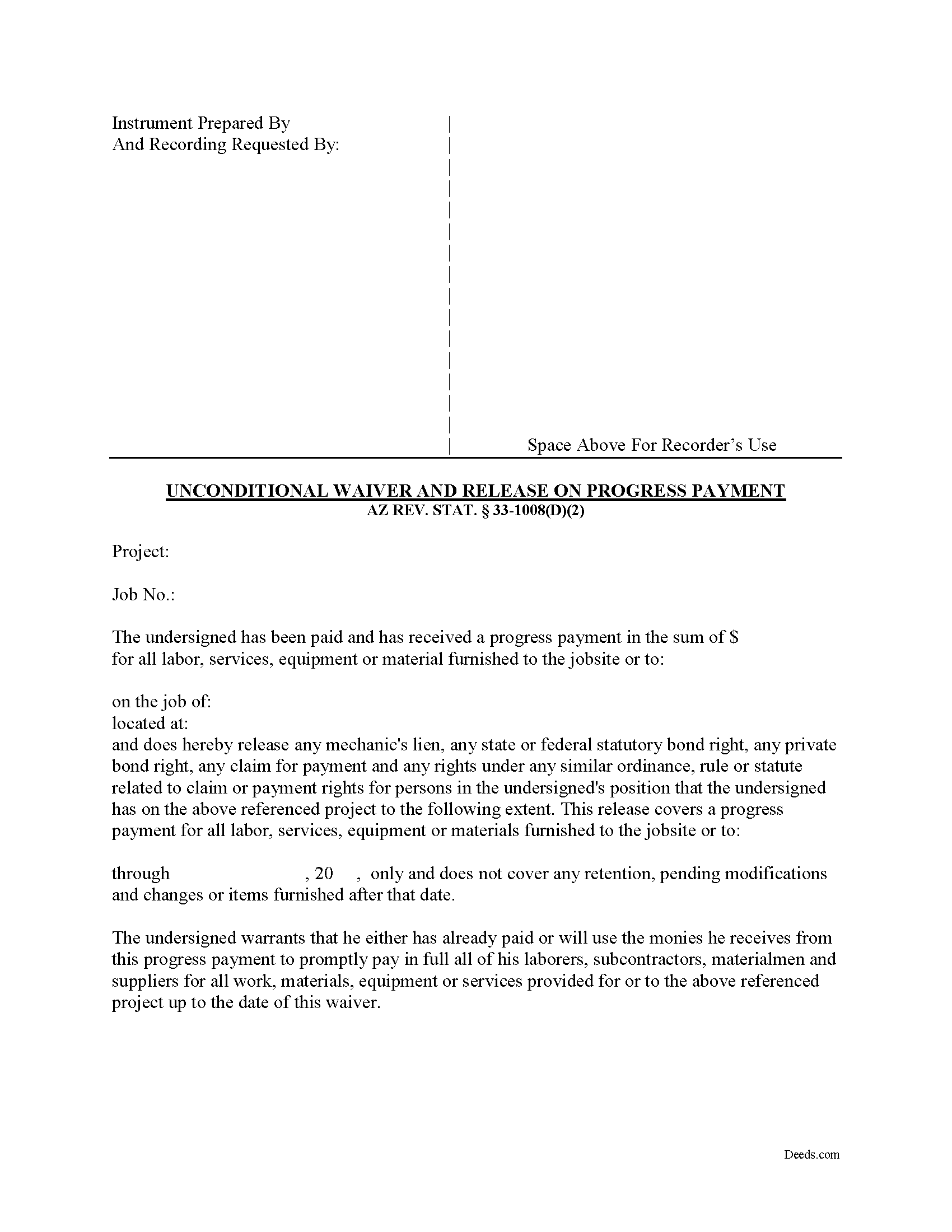
Cochise County Unconditional Lien Waiver on Progress Payment Form
Fill in the blank form formatted to comply with all recording and content requirements.
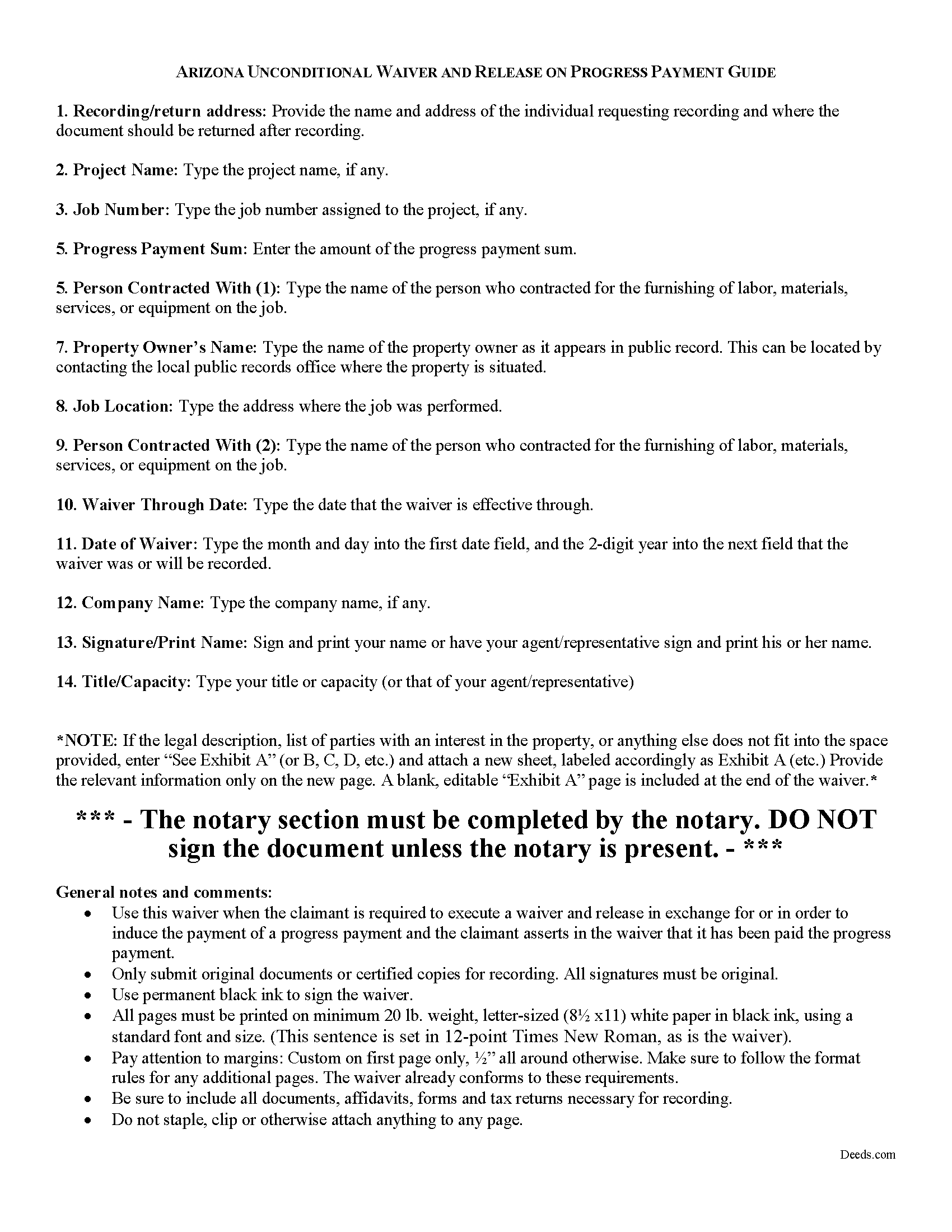
Cochise County Unconditional Lien Waiver of Progress Payment Guide
Line by line guide explaining every blank on the form.
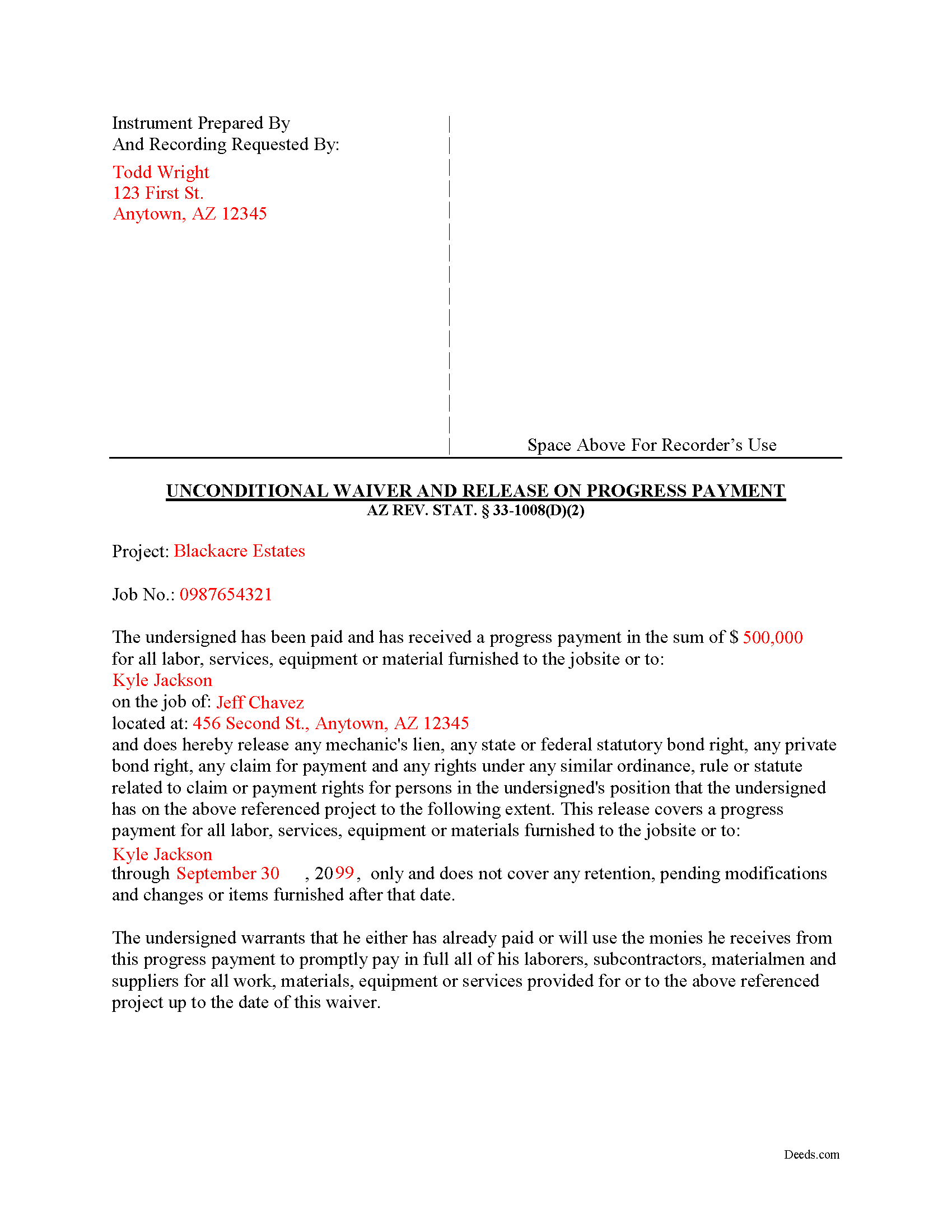
Cochise County Completed Example of the Unconditional Lien Waiver on Progress Payment Document
Example of a properly completed form for reference.
All 3 documents above included • One-time purchase • No recurring fees
Immediate Download • Secure Checkout
Additional Arizona and Cochise County documents included at no extra charge:
Where to Record Your Documents
Recorder's Office
Bisbee, Arizona 85603
Hours: 8:00am - 5:00pm Monday - Friday
Phone: 520-432-8350
Recording Tips for Cochise County:
- Bring your driver's license or state-issued photo ID
- Ensure all signatures are in blue or black ink
- Bring extra funds - fees can vary by document type and page count
- Check margin requirements - usually 1-2 inches at top
- Leave recording info boxes blank - the office fills these
Cities and Jurisdictions in Cochise County
Properties in any of these areas use Cochise County forms:
- Benson
- Bisbee
- Bowie
- Cochise
- Douglas
- Dragoon
- Elfrida
- Fort Huachuca
- Hereford
- Huachuca City
- Mc Neal
- Naco
- Pearce
- Pirtleville
- Pomerene
- Saint David
- San Simon
- Sierra Vista
- Tombstone
- Willcox
Hours, fees, requirements, and more for Cochise County
How do I get my forms?
Forms are available for immediate download after payment. The Cochise County forms will be in your account ready to download to your computer. An account is created for you during checkout if you don't have one. Forms are NOT emailed.
Are these forms guaranteed to be recordable in Cochise County?
Yes. Our form blanks are guaranteed to meet or exceed the applicable formatting requirements used for recording in Cochise County, including margin requirements, font requirements, and other layout standards. This guarantee applies to formatting, not to the legal sufficiency of information entered by the user or the suitability of a form for a particular transaction.
Can I reuse these forms?
Yes. You can reuse the forms for your personal use. For example, if you have multiple properties in Cochise County you only need to order once.
What do I need to use these forms?
The forms are PDFs that you fill out on your computer. The free Adobe Acrobat Reader is recommended, and most PDF apps also work. You do NOT enter your property information online - you download the blank forms and complete them privately on your own computer.
Are there any recurring fees?
No. This is a one-time purchase. Nothing to cancel, no memberships, no recurring fees.
How much does it cost to record in Cochise County?
Recording fees in Cochise County vary. Contact the recorder's office at 520-432-8350 for current fees.
Questions answered? Let's get started!
Lien waivers are part of the Arizona mechanic's lien process. The waiver, given by a contractor, subcontractor, materials supplier or other party to the construction project (the claimant) acknowledging receipt of payment and waiving any future lien rights to the owner's property. Lien waivers are governed under Arizona Revised Statute 33-1008.
In Arizona, lien waivers require strict compliance with the statute and any document purported to waive a lien must follow the statutory format. AZ REV. STAT. 33-1008(A). Any contract or other form attempting to waive lien rights is void as a matter of law. Id. Additionally, lien waivers filed in the state require evidence of actual payment when the waiver is conditioned on receipt of payment. Id.
There are two classifications of lien waivers: conditional and unconditional. Within either class, there are subcategories of "partial" and "final" waivers. Unconditional waivers do not require payment confirmation, but conditional waivers are effective only when payment is received, usually verified by a check clearing the bank. So, an unconditional waiver given after a partial payment releases a portion the claimant's right to lien, regardless of whether or not after any check used to pay the bill clears the bank.
The waiver must contain details identifying the job/project, the amount and type of payment, including the name of the person who wrote any checks, the property owner, the location and a description of the work, relevant dates, and the claimant's signature. 33-1008(D)(2).
This article is provided for informational purposes only and should not be relied on as a substitute for the advice of an attorney. Please contact an Arizona attorney with questions about mechanic's lien waivers.
Important: Your property must be located in Cochise County to use these forms. Documents should be recorded at the county recording office listed above.
This Unconditional Lien Waiver on Progress Payment meets all recording requirements specific to Cochise County.
Our Promise
The documents you receive here are guaranteed to meet or exceed the applicable Cochise County recording format requirements. If there is a rejection caused by our formatting, we will correct the issue or refund your payment. This guarantee applies to document formatting only and does not extend to information entered by the user, the selection of the form, or the legal effect of the completed document.
Save Time and Money
Get your Cochise County Unconditional Lien Waiver on Progress Payment form done right the first time with Deeds.com Uniform Conveyancing Blanks. At Deeds.com, we understand that your time and money are valuable resources, and we don't want you to face a penalty fee or rejection imposed by a county recorder for submitting nonstandard documents. We constantly review and update our forms to meet rapidly changing state and county recording requirements for roughly 3,500 counties and local jurisdictions.
4.8 out of 5 - ( 4,820 Reviews )
Phyllis C. 3 out of 5 stars
So far So Good. Ill come back and re review after it is all finished. I have downloaded all the documents. next I need to fill them out.
Thank you!
Russell R. 5 out of 5 stars
This a seamless way to get a beneficiary deed recorded. Everything was easier than I imagined including the visit to the county. The website and downloads work well and I have no complaints.
Thank you for your kind words and for choosing us.
William P. 5 out of 5 stars
Warranty Deed was just what I needed.Easy to complete and accepted by the county.
Thank you!
Christine K. 5 out of 5 stars
This site was fast and easy to use. I would highly recommend using them. Thank you Deeds.com!!!!
We appreciate your business and value your feedback. Thank you. Have a wonderful day!
Deborah P. 5 out of 5 stars
Very good information. Easy access and easy to download. All the forms needed for TOD to be notarized and recorded with the county office. Much better than working with a Trust and the expense of lawyers, especially when several parties are involved and the owner of said property knows exactly to whom the property should go. Having forms and instructions available for the public to have their wishes recorded and confirmed makes handling final planning much easier and prevents family members from having the unnecessary task of going through court to solve property distribution issues. Thank you for this site and the forms you provide. I will recommend Deeds.com to those I know who are making final plans.
We appreciate your business and value your feedback. Thank you. Have a wonderful day!
Susan M. 5 out of 5 stars
Loved my experience with deeds.com! Easy and simple to fill in the form, plus the extra instructions were helpful! I will use them again!
Thank you for your feedback. We really appreciate it. Have a great day!
Cindy H. 5 out of 5 stars
Loved it! Quick and easy, done in 24 hours.
Thank you for your feedback. We really appreciate it. Have a great day!
Tong B. 5 out of 5 stars
hi, It is very easy to do it. tanks.
Thank you!
Ottomar H. 5 out of 5 stars
Deeds site was easy to use and allowed me to print the forms I needed. No need to change anything.
Thank you!
Mildred S. 5 out of 5 stars
This was an excellent service to amend a deed. It was a little frustrating at first, but well worth it, as they review your documents before submission to your "Recorder of Deeds" to make sure they are not rejected. Would definitely use them again.
We appreciate your business and value your feedback. Thank you. Have a wonderful day!
Gladys F. 5 out of 5 stars
The process was very friendly and easy to use. I appreciated the status updates as well as clear instructions on what was needed to get the file ready for recording.
Thank you!
Deborah D. 5 out of 5 stars
What I thought was gonna be a long drawn out tedious process was literally 10min tops... The help was quick and a load off. Thanks y'all.
We appreciate your business and value your feedback. Thank you. Have a wonderful day!
CORA T. 5 out of 5 stars
very convenient and quick access
Thank you!
Christopher S. 5 out of 5 stars
very easy to use, and comprehensive...I like the e-recording package
We are grateful for your feedback and looking forward to serving you again. Thank you!
WJ H. 5 out of 5 stars
The Quit Claim Deed for the state of Ohio worked for me, saving me the cost of an attorney doing it. O.K., maybe that wouldn't have amounted to more than a few hundred dollars, but anywhere I thought I could save money (and learn something new on top of it) is something I want to do. That said, be forwarned. While I'm not an attorney I'm not averse to spending many hours researching the lingo found in this kind of form and thoroughly understanding exactly how everything has to be filled in. I should add that my ex-wife and I remain friends and she was the one giving me the property/house (thus, technically I filled out the forms on her behalf). Because there was no personal conflict, it made it easier to undertake. Lastly, what others have said about the county office where you must file a Quit Claim Deed not being helpful, that's true in the sense that they do not want to be instructing non-attorneys on filling out the necessary forms. I did take a preliminary draft set of the forms to the county office but was VERY CAREFUL about explaining that I only needed a couple of questions answered about procedure for submitting the final documents. They were helpful once I made it clear I wasn't asking them for "legal advice". And their help was critical as the final submittals requires stopping at three different offices (MapDocuments, Auditor and finally the Recorder's office). So I say thank you to Deeds.com. Their service for the Quit Claim Deed was invaluable.
We appreciate your business and value your feedback. Thank you. Have a wonderful day!