New Castle County Quitclaim Deed (LLC Grantor) Form
Last validated October 14, 2026 by our Forms Development TeamFormatted for recording in New Castle County, for property anywhere in the county: rural and unincorporated areas as well as Bear, Claymont, Delaware City, Hockessin, Kirkwood, Middletown, Montchanin, New Castle and 9 more.
- 3 documents included
- Immediate PDF download
- Formatting guarantee
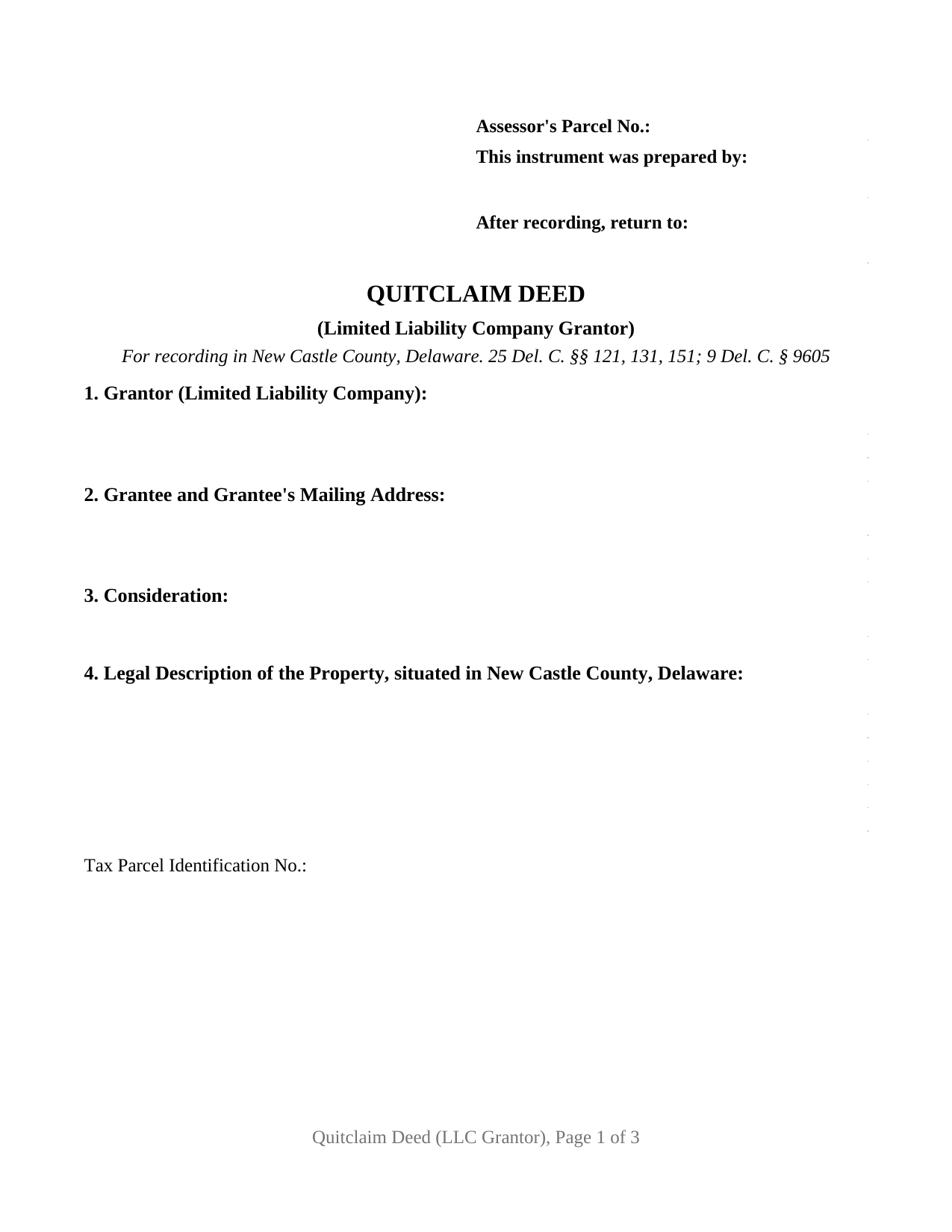
New Castle County Quitclaim Deed (LLC Grantor) Form
Fill in the blank Quitclaim Deed (LLC Grantor) form formatted to comply with all New Castle County, Delaware recording and content requirements.
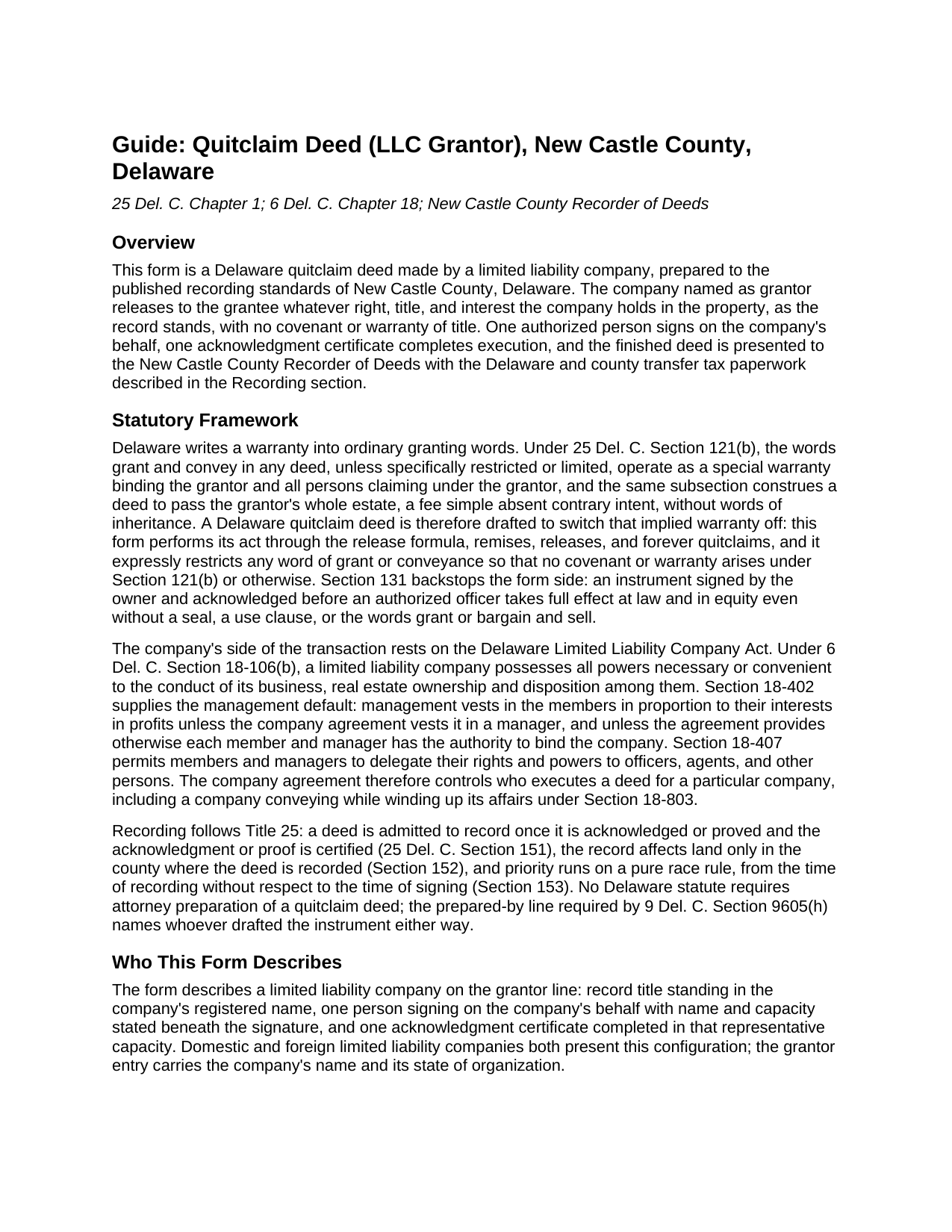
New Castle County Quitclaim Deed (LLC Grantor) Guide
Line by line guide explaining every blank on the Quitclaim Deed (LLC Grantor) form.
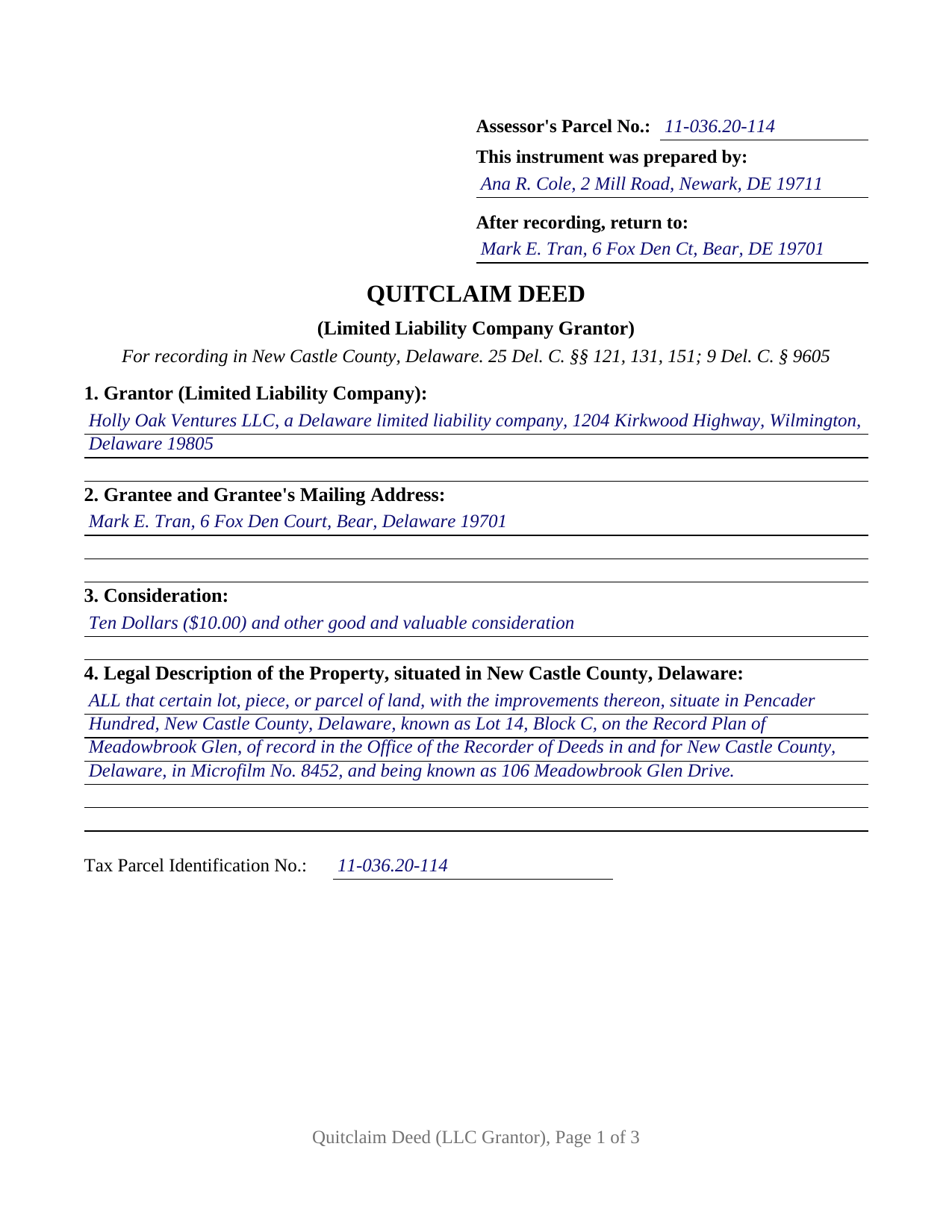
New Castle County Completed Example of the Quitclaim Deed (LLC Grantor) Document
Example of a properly completed Delaware Quitclaim Deed (LLC Grantor) document for reference.
All 3 documents above included • One-time purchase • No recurring fees
Immediate Download • Secure Checkout
Additional Delaware and New Castle County documents included at no extra charge:
Where to Record Your Documents
Recorder of Deeds
Wilmington, Delaware 19801
Hours: 8:30 to 4:00 Monday - Friday / Recording until 3:45
Phone: (302) 395-7700
Recording Tips for New Castle County:
- Bring your driver's license or state-issued photo ID
- Ensure all signatures are in blue or black ink
- Recorded documents become public record - avoid including SSNs
- Recording fees may differ from what's posted online - verify current rates
- Request a receipt showing your recording numbers
Cities and Jurisdictions in New Castle County
Properties in any of these areas use New Castle County forms:
- Bear
- Claymont
- Delaware City
- Hockessin
- Kirkwood
- Middletown
- Montchanin
- New Castle
- Newark
- Odessa
- Port Penn
- Rockland
- Saint Georges
- Townsend
- Wilmington
- Winterthur
- Yorklyn
Hours, fees, requirements, and more for New Castle County
How do I get my forms?
Forms are available for immediate download after payment. The New Castle County forms will be in your account ready to download to your computer. An account is created for you during checkout if you don't have one. Forms are NOT emailed.
Are these forms guaranteed to be recordable in New Castle County?
Yes. Our form blanks are guaranteed to meet or exceed the applicable formatting requirements used for recording in New Castle County, including margin requirements, font requirements, and other layout standards. This guarantee applies to formatting, not to the legal sufficiency of information entered by the user or the suitability of a form for a particular transaction.
Can I reuse these forms?
Yes. You can reuse the forms for your personal use. For example, if you have multiple properties in New Castle County you only need to order once.
What do I need to use these forms?
The forms are PDFs that you fill out on your computer. The free Adobe Acrobat Reader is recommended, and most PDF apps also work. You do NOT enter your property information online - you download the blank forms and complete them privately on your own computer.
Are there any recurring fees?
No. This is a one-time purchase. Nothing to cancel, no memberships, no recurring fees.
How much does it cost to record in New Castle County?
Recording fees in New Castle County vary. Contact the recorder's office at (302) 395-7700 for current fees.
Questions answered? Let's get started!
A limited liability company stands on the grantor line of this Delaware quitclaim deed. The form is configured for an entity grantor: the company's registered name opens the grantor entry, one authorized person signs on its behalf with name and capacity beneath the signature, and one acknowledgment certificate in a representative capacity completes execution. Whatever interest the company holds passes to the grantee exactly as the record leaves it, and no covenant of title trails the conveyance.
Authority Inside the Company
Delaware writes the default signing structure into its Limited Liability Company Act. Under 6 Del. C. § 18-402, management of a limited liability company vests in its members in proportion to their interests in profits unless the company agreement places management in a manager, and unless the agreement provides otherwise each member and manager has the authority to bind the company. Section 18-407 permits delegation of those rights to officers and other agents, and § 18-106(b) gives the company every power necessary or convenient to its business, real estate ownership among them. The company agreement therefore controls who executes a deed for a particular company, and the instrument names that person: the signature block pairs the company name with the signer's own name and stated capacity, member, manager, or authorized person, and the notarial certificate identifies the signer in the same representative role under the short-form certificates at 29 Del. C. § 4329.
Entity Patterns in the Record
The configuration matches title standing in a company name. Patterns presenting an entity grantor in the record include a company winding up its affairs under 6 Del. C. § 18-803 and deeding a remaining parcel over to a member, affiliated companies realigning parcels between themselves, and a company releasing an interest an old conveyance left in its name. The entity architecture is also this edition's boundary: an owner signing in a personal capacity, and human co-owners signing side by side, present signature layouts different from the single representative signature this form carries.
Why the Form Avoids Bare Words of Grant
An unrestricted grant and convey carries an implied special warranty in Delaware (25 Del. C. § 121(b)), a default that would leave the company answerable for title events from its period of ownership. The quitclaim form works through release language instead, or expressly restricts the statutory words, so no warranty arises and nothing in the transfer circles back against the company later. Recording then follows Delaware's pure race rule (25 Del. C. § 153).
Taxes That Follow a Company Deed
Delaware's realty transfer tax runs to the greater of the consideration paid or the property's highest assessed value, and most of the familiar exclusions in 30 Del. C. § 5401(1) operate between people: spouses, parent and child, siblings. A company conveyance generally stands outside those family classes, though the definition carves out conveyances without consideration between parent entities and wholly owned subsidiaries. The Division of Revenue return and affidavit of gain and value travels to the recorder with exempt and taxable deeds alike, and 9 Del. C. § 9607(e) adds an entity-specific gate: a deed from a nonresident pass-through entity records only after the recorder collects the estimated income tax the entity declares, on the same declaration a Delaware-resident company uses to state its status.
County Editions for a County-Governed Record
Recording law in Delaware runs county by county. 9 Del. C. § 9605(g) delegates paper size, margins, type size, and blank-space regulation to the recorder of deeds in each county, and the three published rulebooks part ways on the first-page reserve, the placement of the parcel and preparer data, and the minimum type. Statewide acceptance gates ride on every edition, from the county tax parcel identification number displayed conspicuously (9 Del. C. § 9605(f)) to the first-page line naming the person who prepared the instrument (9 Del. C. § 9605(h)). Because one layout cannot satisfy all three offices, this LLC quitclaim deed is researched and prepared per county, and the purchase delivers the edition matching the buyer's recording county: New Castle County, Kent County, or Sussex County.
Every county edition of this entity quitclaim deed, a form also searched as an LLC quit claim deed or a business quitclaim form, carries three pieces: the blank instrument as a fillable PDF, a completed example worked on a company fact pattern in that county, and a plain language guide to each entry. The materials are informational and are not legal advice.
Important: Your property must be located in New Castle County to use these forms. Documents should be recorded at the county recording office listed above.
This Quitclaim Deed (LLC Grantor) meets all recording requirements specific to New Castle County.
Our Promise
The documents you receive here are guaranteed to meet or exceed the applicable New Castle County recording format requirements. If there is a rejection caused by our formatting, we will correct the issue or refund your payment. This guarantee applies to document formatting only and does not extend to information entered by the user, the selection of the form, or the legal effect of the completed document.
Save Time and Money
Get your New Castle County Quitclaim Deed (LLC Grantor) form done right the first time with Deeds.com Uniform Conveyancing Blanks. At Deeds.com, we understand that your time and money are valuable resources, and we don't want you to face a penalty fee or rejection imposed by a county recorder for submitting nonstandard documents. We constantly review and update our forms to meet rapidly changing state and county recording requirements for roughly 3,500 counties and local jurisdictions.
4.8 out of 5 - ( 4,830 Reviews )
Julie G. 5 out of 5 stars
Such a great site!! Everyone is so helpful! Thanks again! Julie
We appreciate your business and value your feedback. Thank you. Have a wonderful day!
Dorothy J F. 5 out of 5 stars
Appreciated the prompt answers to my inquiries…
We are grateful for your engagement and feedback, which help us to serve you better. Thank you for being an integral part of our community.
David S. 3 out of 5 stars
I downloaded the quit claim deed form and saved it on my computer. I opened it with Adobe and filled it out. The space for the legal description was too small (2 lines only) which did not allow enough room for the long property description that I had.
Thank you for your feedback. We really appreciate it. Have a great day!
Norman K. 2 out of 5 stars
It wasn't really what I needed I read and read and read and read and I thought I was to do with for filing for probate or probate executor but instead it was for the property if you are executor and but it wasn't very clear on that so it didn't work for me so I was kind of wasted money
Sorry to hear that Norman. We've gone ahead and canceled your order and payment.
Precious M. 5 out of 5 stars
great quick response
Thank you!
Sofia H. 5 out of 5 stars
Where has this site been my entire career? Very helpful. This site made what would normally take three days with a runner, a snap. Five Stars.
Thank you for your feedback. We really appreciate it. Have a great day!
Kelly S. 5 out of 5 stars
Fast, easy, responsive.
Thank you!
Helen L. 5 out of 5 stars
The website was easy to navigate but only needed one form. The guide was helpful also. Cost want high but contains many documents that I didn't need but may someday. Could not save form after completed but printed copies that needed to be court filed.
We appreciate your business and value your feedback. Thank you. Have a wonderful day!
Diane S. 5 out of 5 stars
Money well spent. I used the example and filled out with no problem.
We appreciate your business and value your feedback. Thank you. Have a wonderful day!
Stephen W. 5 out of 5 stars
It provided the forms I could not find elsewhere. Thank you.
Thank you!
Gary G. 5 out of 5 stars
Ordered the forms I needed for my state and county and everything worked out perfectly. All the forms came with examples (filled in) and very detailed instructions for each block that required an entry. I was able to fill everything out on my computer and save the files for future use, if required. Deeds provides an excellent product. I highly recommend their products and will use their services again.
Thank you for your feedback. We really appreciate it. Have a great day!
Abigail Frances B. 5 out of 5 stars
Thanks for the easy download, clear instructions, good price- I'm looking forward to filling them out.
Thank you for your feedback. We really appreciate it. Have a great day!
Dawn Y. 1 out of 5 stars
Obtaining a copy of a deed is FAR too expensive.
Thank you for your feedback Dawn. Have a wonderful day.
Qingqiu H. 5 out of 5 stars
I ordered the wrong forms at first because I'm an idiot and didn't do my research. When I told the customer service about my error they were understanding.
Thank you for your feedback. We really appreciate it. Have a great day!
Carl S. 5 out of 5 stars
Complete and easy to order. Helpful other documents were included.
Thank you for your feedback. We really appreciate it. Have a great day!