Calhoun County Quitclaim Deed (LLC Grantor) Form
Last validated October 9, 2026 by our Forms Development TeamFormatted for recording in Calhoun County, for property anywhere in the county: rural and unincorporated areas as well as Altha, Blountstown, Clarksville, Wewahitchka.
- 3 documents included
- Immediate PDF download
- Formatting guarantee
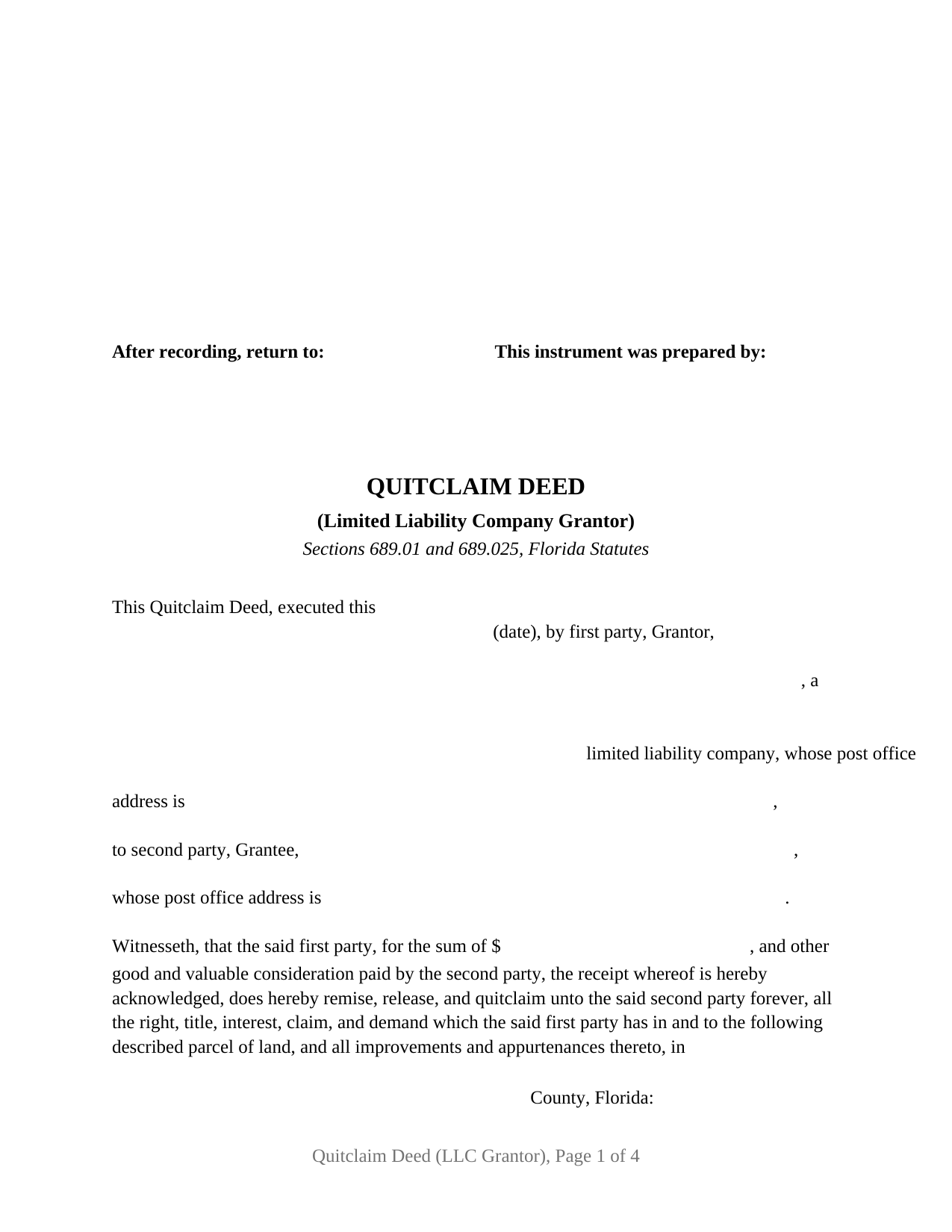
Calhoun County Quitclaim Deed (LLC Grantor) Form
Fill in the blank Quitclaim Deed (LLC Grantor) form formatted to comply with all Florida recording and content requirements.
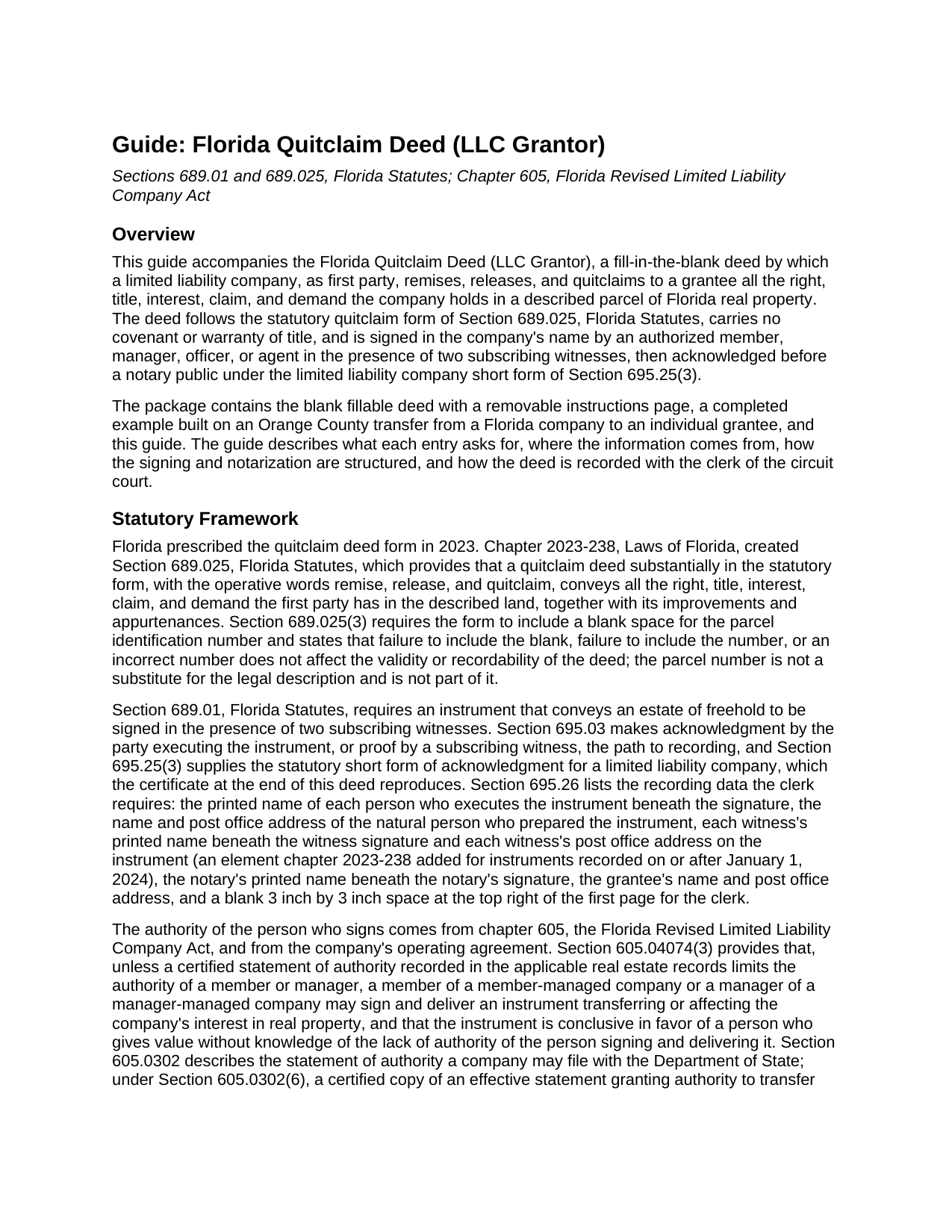
Calhoun County Quitclaim Deed (LLC Grantor) Guide
Line by line guide explaining every blank on the Quitclaim Deed (LLC Grantor) form.
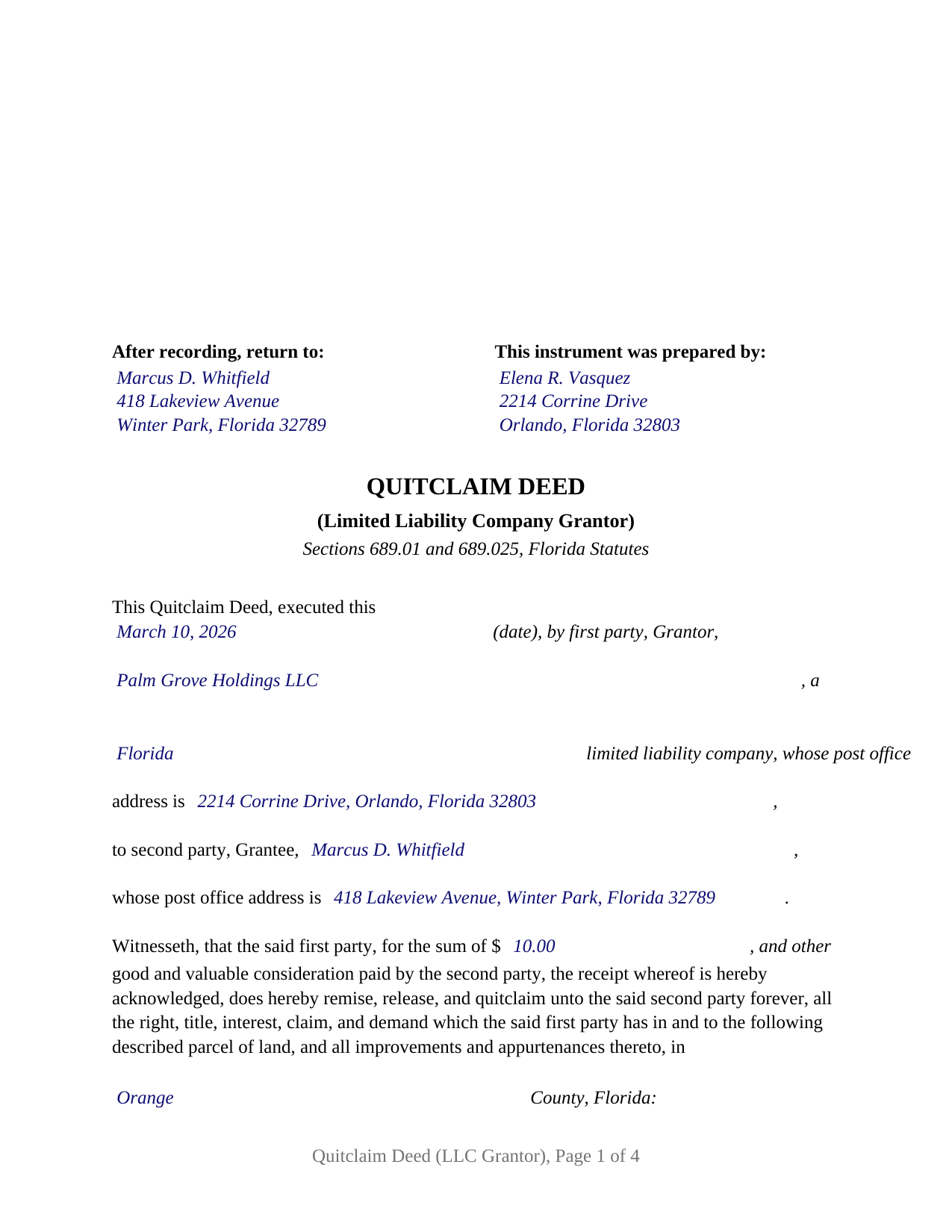
Calhoun County Completed Example of the Quitclaim Deed (LLC Grantor) Document
Example of a properly completed Florida Quitclaim Deed (LLC Grantor) document for reference.
All 3 documents above included • One-time purchase • No recurring fees
Immediate Download • Secure Checkout
Additional Florida and Calhoun County documents included at no extra charge:
Where to Record Your Documents
Calhoun County Clerk of the Court
Blountstown, Florida 32424
Hours: 8:00am to 4:00pm M-F
Phone: (850) 674-4545
Recording Tips for Calhoun County:
- Bring your driver's license or state-issued photo ID
- Ensure all signatures are in blue or black ink
- Recording fees may differ from what's posted online - verify current rates
- Request a receipt showing your recording numbers
- Ask about accepted payment methods when you call ahead
Cities and Jurisdictions in Calhoun County
Properties in any of these areas use Calhoun County forms:
- Altha
- Blountstown
- Clarksville
- Wewahitchka
Hours, fees, requirements, and more for Calhoun County
How do I get my forms?
Forms are available for immediate download after payment. The Calhoun County forms will be in your account ready to download to your computer. An account is created for you during checkout if you don't have one. Forms are NOT emailed.
Are these forms guaranteed to be recordable in Calhoun County?
Yes. Our form blanks are guaranteed to meet or exceed the applicable formatting requirements used for recording in Calhoun County, including margin requirements, font requirements, and other layout standards. This guarantee applies to formatting, not to the legal sufficiency of information entered by the user or the suitability of a form for a particular transaction.
Can I reuse these forms?
Yes. You can reuse the forms for your personal use. For example, if you have multiple properties in Calhoun County you only need to order once.
What do I need to use these forms?
The forms are PDFs that you fill out on your computer. The free Adobe Acrobat Reader is recommended, and most PDF apps also work. You do NOT enter your property information online - you download the blank forms and complete them privately on your own computer.
Are there any recurring fees?
No. This is a one-time purchase. Nothing to cancel, no memberships, no recurring fees.
How much does it cost to record in Calhoun County?
Recording fees in Calhoun County vary. Contact the recorder's office at (850) 674-4545 for current fees.
Questions answered? Let's get started!
When Florida real estate sits in the name of a limited liability company, moving it out again, to a member taking a distribution, to a related entity in a reorganization, or to a buyer who has bargained for exactly what the company holds, is a company act. This quitclaim deed performs that act in the form Florida law prescribes: the company, as first party, remises, releases, and quitclaims to the grantee all the right, title, interest, claim, and demand it has in the described land, without covenant or warranty of title.
Whatever the company holds, and no more
A quitclaim deed makes no promise about the state of the title. If the company holds fee simple title, that is what passes; a partial interest passes as a partial interest; and liens, mortgages, and other encumbrances continue against the property in the grantee's hands. That candor is the instrument's point: it moves an interest between parties who already know the title's history, which is why it appears so often in transfers between a company and its own members or between related entities. Florida adds a wrinkle few states share: under Section 695.01(2), Florida Statutes, grantees by quitclaim deed are deemed bona fide purchasers without notice within the recording act.
The statutory form, adopted in 2023
Florida wrote the quitclaim deed into statute in 2023, when chapter 2023-238, Laws of Florida, created Section 689.025. The section prescribes the deed's substantial form, requires a legibly printed legal description, and requires a blank for the property appraiser's parcel identification number. This form carries the statutory narrative, from the executed-this-date opening through the operative remise, release, and quitclaim clause, and adds the recitals a company deed needs: the state of formation, and a statement that the person signing executes in a representative capacity and not individually.
Signing in the company's name
The deed is signed by an authorized member, manager, officer, or agent, with printed name and title beneath the signature. Authority comes from chapter 605, the Florida Revised Limited Liability Company Act, and the company's operating agreement: Section 605.04074 makes a member of a member-managed company, or a manager of a manager-managed company, an agent who may sign and deliver an instrument transferring the company's real property unless a recorded certified statement of authority limits that power, and a recorded statement of authority under Section 605.0302 can make a grant of authority conclusive in favor of a person who gives value in reliance on it. Florida's execution formalities apply in full: two subscribing witnesses under Section 689.01, each with a printed name and post office address on the deed as Section 695.26 has required since January 2024, and the statutory limited liability company acknowledgment of Section 695.25(3), completed by the notary with the physical presence or online notarization indication and followed by a reserved area for the notary's rubber stamp seal.
At the recording counter
The deed is recorded with the clerk of the circuit court of the county where the property is located, its first page keeping clear the 3 inch by 3 inch top right space the clerk's recording information occupies. Documentary stamp tax falls due at recording, computed on consideration as Section 201.02 defines it, which includes an outstanding mortgage balance even when no money changes hands; the guide walks through the rates, including Miami-Dade's separate structure.
The package includes the fillable deed, a completed example documenting a realistic Orange County transfer from a Florida company to an individual grantee, and a plain language guide covering every blank, the chapter 605 authority rules, and the recording steps. The materials are informational and are not legal advice; a Florida attorney can apply these statutes to a particular company and title.
Important: Your property must be located in Calhoun County to use these forms. Documents should be recorded at the county recording office listed above.
This Quitclaim Deed (LLC Grantor) meets all recording requirements specific to Calhoun County.
Our Promise
The documents you receive here are guaranteed to meet or exceed the applicable Calhoun County recording format requirements. If there is a rejection caused by our formatting, we will correct the issue or refund your payment. This guarantee applies to document formatting only and does not extend to information entered by the user, the selection of the form, or the legal effect of the completed document.
Save Time and Money
Get your Calhoun County Quitclaim Deed (LLC Grantor) form done right the first time with Deeds.com Uniform Conveyancing Blanks. At Deeds.com, we understand that your time and money are valuable resources, and we don't want you to face a penalty fee or rejection imposed by a county recorder for submitting nonstandard documents. We constantly review and update our forms to meet rapidly changing state and county recording requirements for roughly 3,500 counties and local jurisdictions.
4.8 out of 5 - ( 4,828 Reviews )
Suzanne R. 5 out of 5 stars
I was very impressed with how user friendly, convenient, and efficient the whole process was. I will definitely use the service again sometime soon.
Thank you for your feedback. We really appreciate it. Have a great day!
Quinn R. 5 out of 5 stars
DEEDS.COM IS THE BEST WAY TO E-RECORD DEEDS. THEY ARE FAST, POLITE AND A FANTASTIC DEAL FOR THE SERVICE THAT THEY OFFER!!!
Thank you!
Cindy H. 5 out of 5 stars
Loved it! Quick and easy, done in 24 hours.
Thank you for your feedback. We really appreciate it. Have a great day!
Rosemary W. 5 out of 5 stars
considering the current epidemic your fees save me time and parking fees. with help from DC recorder of deeds I was directed to the correct link to process my deed
Thank you for your feedback. We really appreciate it. Have a great day!
Johnny B. 5 out of 5 stars
This site was a breeze using.
We appreciate your business and value your feedback. Thank you. Have a wonderful day!
Lisa P. 5 out of 5 stars
Wonderful forms. It's nice that they were formatted perfectly for my county, it's real easy to miss a requirement (margines, font size, and so on) and end up with a rejection or higher recording fee. Good job folks!
Thank you!
Mary D. 5 out of 5 stars
Gift Deed is exactly what was required. Thank you!
Thank you for your feedback. We really appreciate it. Have a great day!
Thomas J. 5 out of 5 stars
I'm pleased with the service
Thank you!
MARY P. 5 out of 5 stars
Quick easy and reliable. Thank you
Happy we could assist. Thank you for sharing your experience.
Zerrin M. 5 out of 5 stars
I’m in Clearwater, FL and needed to record a something in Palm Beach County. Deeds.com made the entire process incredibly simple. I submitted the documents, they sent it back once (same day) for a small correction, I fixed it and returned them, and everything was completed within the same day. It was even much faster and more convenient than going to my local recorder’s office. In-person usually means planning when to go, driving across town, paying for parking, and waiting in line — all of which I avoid with Deeds.com. Highly recommended!
Thank you, Zerrin! Glad we could save you the trip across town. We appreciate you taking the time to share your experience.
Hideo K. 5 out of 5 stars
Very prompt and satisfied with the service.
We appreciate your business and value your feedback. Thank you. Have a wonderful day!
Johnny H. 5 out of 5 stars
The format presented is exactly what is needed to produce a perfect listing in the registry of The Maricopa County Office of the Recorder. Thanks for an effective solution to a very important document.
Thank you!
diana c. 5 out of 5 stars
quick and easy, thankyou
Thank you!
Carol S. 5 out of 5 stars
Needed a Quit Claim Deed and am so happy I went to Deeds.com. Completed my forms - they looked professional and had no problem submitting them to Assessor's office. PERFECT!
We appreciate your business and value your feedback. Thank you. Have a wonderful day!
Doreen A. 5 out of 5 stars
Easy to navigate Efficient Service
Your kind words warm our hearts. Thank you for sharing your experience!