Barnstable County Notice of Identification Form
Last validated September 22, 2026 by our Forms Development TeamFormatted for recording in Barnstable County, for property anywhere in the county: rural and unincorporated areas as well as Barnstable, Brewster, Buzzards Bay, Cataumet, Centerville, Chatham, Cotuit, Cummaquid and 45 more.
- 3 documents included
- Immediate PDF download
- Formatting guarantee
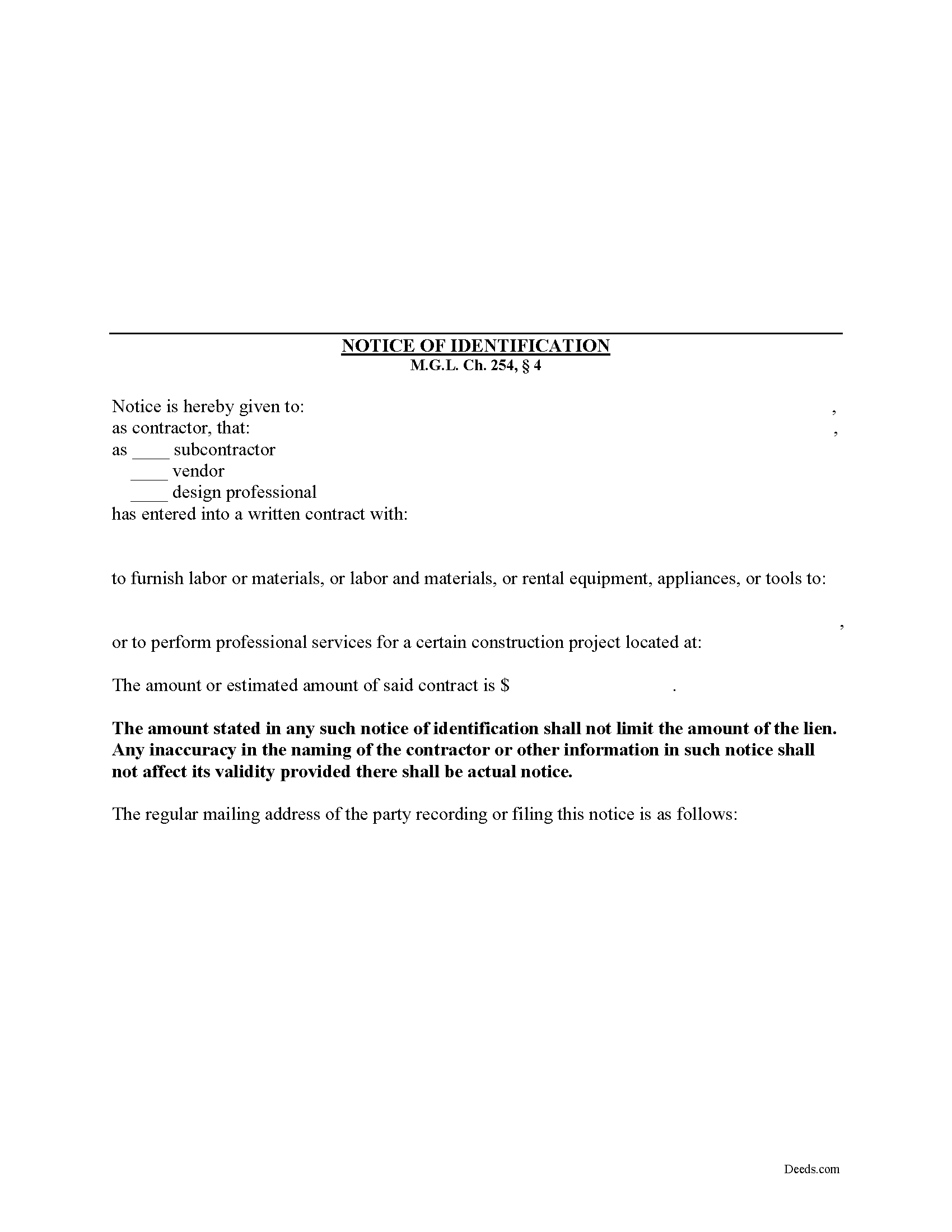
Barnstable County Notice of Identification Form
Fill in the blank Notice of Identification form formatted to comply with all Massachusetts recording and content requirements.
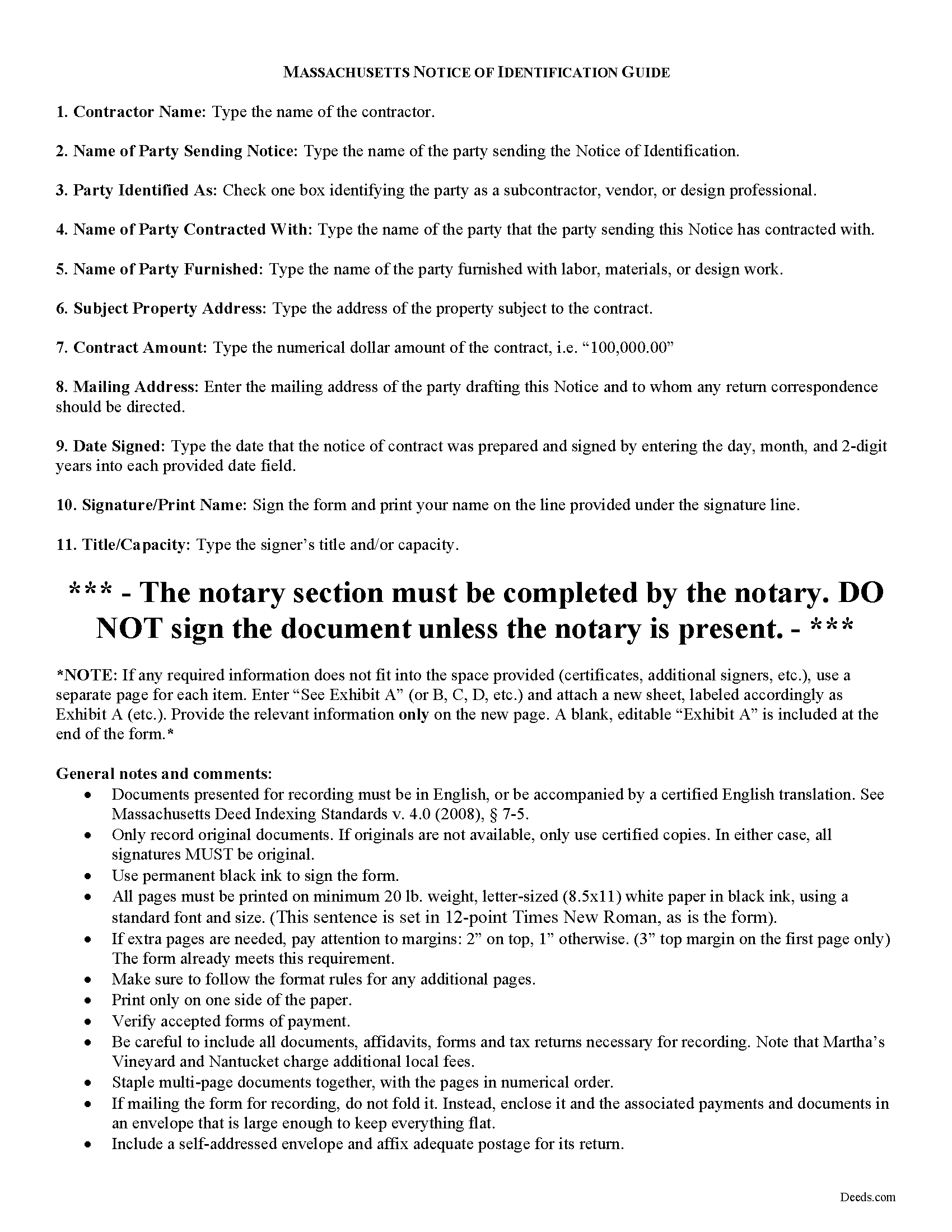
Barnstable County Notice of Indentification Guide
Line by line guide explaining every blank on the form.
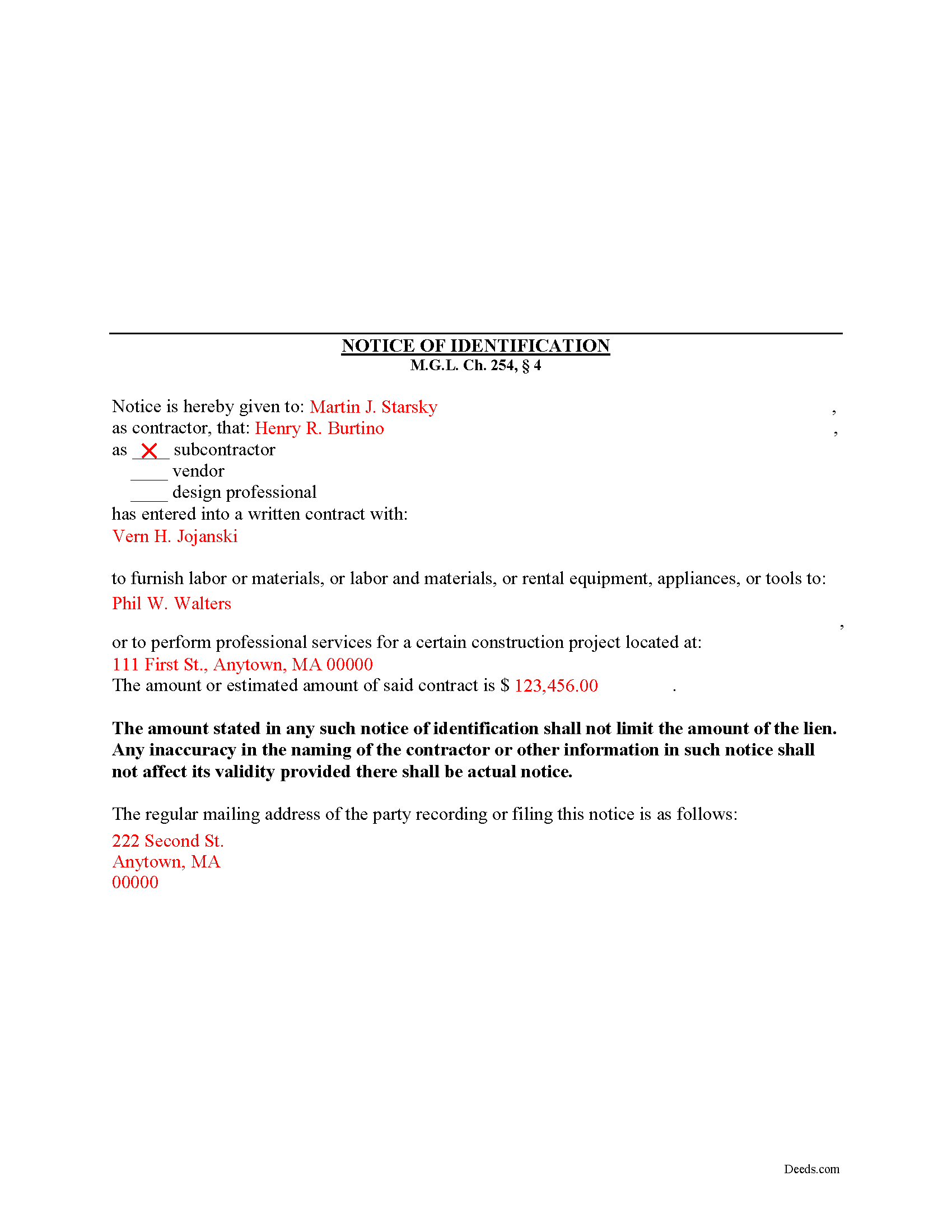
Barnstable County Completed Example of the Notice of Indentification Document
Example of a properly completed form for reference.
All 3 documents above included • One-time purchase • No recurring fees
Immediate Download • Secure Checkout
Additional Massachusetts and Barnstable County documents included at no extra charge:
Where to Record Your Documents
Barnstable County Registry of Deeds
Barnstable, Massachusetts 02630
Hours: 8:00 to 4:00 Monday through Friday
Phone: (508) 362-7733
Recording Tips for Barnstable County:
- Bring your driver's license or state-issued photo ID
- Ensure all signatures are in blue or black ink
- White-out or correction fluid may cause rejection
- Ask about their eRecording option for future transactions
- Avoid the last business day of the month when possible
Cities and Jurisdictions in Barnstable County
Properties in any of these areas use Barnstable County forms:
- Barnstable
- Brewster
- Buzzards Bay
- Cataumet
- Centerville
- Chatham
- Cotuit
- Cummaquid
- Dennis
- Dennis Port
- East Dennis
- East Falmouth
- East Orleans
- East Sandwich
- Eastham
- Falmouth
- Forestdale
- Harwich
- Harwich Port
- Hyannis
- Hyannis Port
- Marstons Mills
- Mashpee
- Monument Beach
- North Chatham
- North Eastham
- North Falmouth
- North Truro
- Orleans
- Osterville
- Pocasset
- Provincetown
- Sagamore
- Sagamore Beach
- Sandwich
- Silver Beach
- South Chatham
- South Dennis
- South Harwich
- South Orleans
- South Wellfleet
- South Yarmouth
- Truro
- Wellfleet
- West Barnstable
- West Chatham
- West Dennis
- West Falmouth
- West Harwich
- West Hyannisport
- West Yarmouth
- Woods Hole
- Yarmouth Port
Hours, fees, requirements, and more for Barnstable County
How do I get my forms?
Forms are available for immediate download after payment. The Barnstable County forms will be in your account ready to download to your computer. An account is created for you during checkout if you don't have one. Forms are NOT emailed.
Are these forms guaranteed to be recordable in Barnstable County?
Yes. Our form blanks are guaranteed to meet or exceed the applicable formatting requirements used for recording in Barnstable County, including margin requirements, font requirements, and other layout standards. This guarantee applies to formatting, not to the legal sufficiency of information entered by the user or the suitability of a form for a particular transaction.
Can I reuse these forms?
Yes. You can reuse the forms for your personal use. For example, if you have multiple properties in Barnstable County you only need to order once.
What do I need to use these forms?
The forms are PDFs that you fill out on your computer. The free Adobe Acrobat Reader is recommended, and most PDF apps also work. You do NOT enter your property information online - you download the blank forms and complete them privately on your own computer.
Are there any recurring fees?
No. This is a one-time purchase. Nothing to cancel, no memberships, no recurring fees.
How much does it cost to record in Barnstable County?
Recording fees in Barnstable County vary. Contact the recorder's office at (508) 362-7733 for current fees.
Questions answered? Let's get started!
Subcontractors, vendors, and design professionals involved in a work of improvement must send a special type of notice when they have not contracted directly with the original contractor or property owner and are working under another party. This preserves these individual's rights to a mechanic's lien while letting the owner know who is involved in the job and may have a later claim if unpaid.
In Massachusetts, a lien claimant without a direct contractual relationship with the original contractor, except for liens for labor, can only claim an amount of lien less than or equal to the amount due or to become due under the subcontract between the original contractor and the subcontractor whose work includes the work of the person claiming the lien. M.G.L. Ch. 254, 4. However, if the claimant files a Notice of Identification within thirty (30) days of commencement of his performance, lien rights are preserved for the full amount of services or materials expended. Id.
The Notice of Identification contains the following information: 1) contractor's name; 2) name of the party sending the notice; 3) whether the claimant is a subcontractor, vendor, or design professional; 4) name of the person contracted with; 5) name of the person or party furnished; 6) the property address where work is performed; and 7) the amount of the contract. Id. The Notice must be sent via certified mail, return receipt requested, to the original contractor within thirty (30) days of starting performance.
The amount stated in any such notice of identification shall not limit the amount of the lien. Id. Any inaccuracy in the naming of the contractor or other information in such notice shall not affect its validity provided there is actual notice. Id.
This article is provided for informational purposes only and should not be relied upon as a substitute for professional legal advice. If you have questions about the Notice of Identification, or any other issues related to lien laws in Massachusetts, please consult with an attorney.
Important: Your property must be located in Barnstable County to use these forms. Documents should be recorded at the county recording office listed above.
This Notice of Identification meets all recording requirements specific to Barnstable County.
Our Promise
The documents you receive here are guaranteed to meet or exceed the applicable Barnstable County recording format requirements. If there is a rejection caused by our formatting, we will correct the issue or refund your payment. This guarantee applies to document formatting only and does not extend to information entered by the user, the selection of the form, or the legal effect of the completed document.
Save Time and Money
Get your Barnstable County Notice of Identification form done right the first time with Deeds.com Uniform Conveyancing Blanks. At Deeds.com, we understand that your time and money are valuable resources, and we don't want you to face a penalty fee or rejection imposed by a county recorder for submitting nonstandard documents. We constantly review and update our forms to meet rapidly changing state and county recording requirements for roughly 3,500 counties and local jurisdictions.
4.8 out of 5 - ( 4,828 Reviews )
William V. 5 out of 5 stars
I finally got it. Thanks, William Vickery
Thank you!
christopher c. 5 out of 5 stars
Everything was professionally, handled and the process was simple and easy. I appreciated the responsiveness and recommendations from the reviewer of my package and look forward to getting my other submissions done. Wish I knew about this process sooner, thanks
Thanks, Christopher! We're glad the process was smooth and our team could help. Looking forward to assisting with your future submissions!
Scott D. 5 out of 5 stars
I am very satisfied with the quality of the product I ordered. I have done similar property transfers/recording in the past on my own but paying for the forms and guidance is well worth it. The AI question area is extremely helpful. The example for the forms is perfect (as it has to be). I will absolutely use Deeds.com in the future for any related property needs. A+
We appreciate your business and value your feedback. Thank you. Have a wonderful day!
Rex M. 5 out of 5 stars
fulfilled all NC requirements
Thank you!
John Q. 5 out of 5 stars
I downloaded the forms, which was very easy, and filled them out with the help of the very helpful instructions! I was able to go down to my court house and file the forms within 24 hours of downloading! I am at peace knowing my son's will avoid a lot of headaches when I pass because my property deed will transfer to them without probate court TOD !!!!
We appreciate your business and value your feedback. Thank you. Have a wonderful day!
Evelyn R. 5 out of 5 stars
Filing my deed through your service was great. All directions were clear and specific; it was very easy to upload the documents and most of all feedback from your office was professional and very timely. You service was excellent. Thank you!! Thank you so very much!!
Thank you for your feedback. We really appreciate it. Have a great day!
Lisa P. 5 out of 5 stars
Your forms are worth the investment. The guide and example were very helpful and thorough.
We appreciate your business and value your feedback. Thank you. Have a wonderful day!
Kerry H. 5 out of 5 stars
Good experience - Just what I needed
Thank you Kerry, have an awesome day!
Frankie A. 4 out of 5 stars
Deeds.com recorded documents for me without any issue. It's a good service and provides a lot of assistance on its web site. However, I asked for a printed receipt (i.e. an pdf copy of one), but after a staff provided me with an obvious answer, they simply ignored my follow up requests. I also asked a simple formatting question that they should have been able to answer; instead, they passed the buck and referred me to the recorder, which currently is a very time-consuming venture. They also have no telephone number for any issue. Generally, the service saves me the time and effort of physically recording a document, but when you think about $19.00 per recording seems like a steep price for the services rendered.
We appreciate your feedback Frankie. We are glad that we were able to submit your documents as requested. Sorry to hear that we let you down in other areas. We do encourage you to shop around for services that may better suit your needs. Have a wonderful day.
Jennifer T. 5 out of 5 stars
I got instant access to the exact forms I needed! The guide to completing the form was very thorough and easy to understand. I am very thankful for this service!
Thank you for the kind words Jennifer. We appreciate you!
Charles S. 5 out of 5 stars
I was very please with the deed, deed of trust and the deed of trust note. It save me a lot of preparation time.
Thank you!
Cynthia S. 5 out of 5 stars
The staff was wonderful we needed an additional state form for Wisconsin for the transfer. They went Above And Beyond assisting it was they were just amazing. They are truly an asset and I am very grateful.
Great to hear — thank you for taking the time to write a review.
Giustino C. 5 out of 5 stars
I am pleased with this electronic service in making a time sensitive deed transfer since very few options exist currently with the Covid 19 Crisis. This was the only rapid and available option to record the deed transfer and the fee was reasonable. I was able to upload my notarized and executed document and had a record number as well as the official document within 24 hours. It was simple and easy to use. Thank you deeds.com!!
Thank you Giustino, glad we could help.
JAVIER B. 5 out of 5 stars
EXCELLENT JOB DEEDS.COM I AM SO PROUD I WAS ABLE TO RECEIVE A COPY OF THE REAL ESTATE DEED FROM MY OLD HOME OUT OF TOWN. HIGHLY RECOMMEND!!!
Thank you for your feedback. We really appreciate it. Have a great day!
Christina H. 5 out of 5 stars
The process was straightforward, quick and reasonably priced. The agents provided updates every step of the way.
Thank you!